Hosted Vs. Premise Phone Systems

When choosing a communications solution that is best for your business, do you go with a traditional on premise system, or should you consider moving to the cloud with a hosted system? As with all business decision, you need to weigh the costs and benefits of all options. Consider the following when comparing premise vs. hosted solutions for your business:

  1. TCO – total cost of ownershinecmonitor356web
  2. Network Assessments and Service Level Agreements
  3. Call quality and reliability
  4. Obsolescence and scalability
  5. Flexibility and remote access

Like all technology these days, communications is moving to the cloud. Just as you can choose hosted enterprise “software as a service” (SaaS), telecommunications providers are now offering full business communications systems that are web based, or hosted. The advantages are obvious: scalability, flexibility, ability to use a wide variety of devices from anywhere 24/7. But there are other considerations: cost, both initial and over time, reliability and security.

In the past, premise solutions (where the entire system is based physically in your office) were often chosen because of low TCO and high levels of security, since the communications system was onsite. Cloud based communications solutions offer low upfront cost, greater flexibility and low maintenance costs. Of course every business is different, and TCO depends greatly on the size and number of locations of a business. A business with a few very large sites may end up with lower TCO staying with on premise solutions, while a business with many small sites might benefit from using a hosted solutions.

If you have a large, spread out employee base with a wide variety of needs and mobile devices, the cloud based solutions can save you a significant amount of money by allowing BYOD: (Bring Your Own Device), where employees can use their own mobile devices on your business system by simply installing an app. Using the cloud, you are not bound to any specific brand or even certain standards, since there are apps available to connect virtually any communication device imaginable, now or in the future. It also allows for one-number access no matter where or what device an employee is currently using.

nec-conference-611But if you are a small single location office, this type of flexibility and scalability is unnecessary. In this case, a more standard premise based solution may be appropriate. A business should not let the excitement of moving with the newest technology trend outweigh a thorough review of the costs and benefits. Also, modern premise systems come with many of the same options as hosted systems.

Always consult with a reliable, trustworthy expert in the communications field. SoundTel will be happy to answer any questions you have about hosted vs. premise and which is right for your business. For 30 years, we have assisted companies like yours in their every communications need. We are a local, family-owned business invested in our community. Contact SoundTel or call 425.481.5493 or 800.797.3663 to learn more.

Can a New Telephone System Save Lives?

Healthcare15If you run a healthcare business or senior care facility, putting someone on extended hold or missing a call could be a matter of life or death. Answering all calls in a timely matter is more than good customer service in the healthcare industry. Yet many offices struggle with out-of-date systems that are unable to handle growing clientele numbers efficiently and effectively. Simply parking customers on hold for several minutes is not acceptable.

A recent article, An RX For Hospitals: Communications Overhaul, on the website Breakthroughs, highlights this issue in a healthcare setting. The story, which first appeared on the Dallas NPR station KERA radio, focused on how NEC’s technology helped John Peter Smith (JPS) Hospital in Ft. Worth not only save money, but also save lives and improve the patient experience.

200181824-001As the article highlights, there is a wide range of technologies to upgrade or replace aging systems. VoIP offers faster, clearer and more reliable service than many traditional phone lines. IP-based communications allow businesses to answer phones through their laptops, check their email for voicemail left in their office, and run high-bandwidth medical applications that are becoming more popular.

As an authorized NEC dealer, SoundTel can help you find the perfect new phone system or offer upgrades for your current NEC system. For 30 years, we have assisted companies like yours in their every communications need. We are a local, family-owned business invested in our community. ContactSoundTel or call 425.481.5493 or 800.797.3663 to learn more.

Support Ends for NEAX 2400 & 2000 Family of Products

phonestarewebIf you have an older NEC system, SoundTel has an important notice: as of April 1st, 2014, NEC no longer supports the NEAX 2400 & 2000 family of products. Now that these systems have reached their end-of-life, it is critical that you understand the impact of this change and what to do to avoid the possibility of system failure and interruption to your business.

What does this mean for you? Since there will be no support for NEAX 2400 & 2000 product, if your business is still using these systems, continuing to operate an end-of-life/end-of-support communication system poses a number of risks to your organization, including loss of:

  • Newly manufactured replacement parts
  • Software support
  • Technical support from the manufacturer
  • New software enhancements

Because keeping your businesses operations are critical, we believe it is urgent that you take action to ensure continued support of your NEC voice PBX systems. NEC and SoundTel suggests customers like you migrate to the latest UNIVERGE technologies. We know you understand how critical your voice communications system is to running your businesses. Here are some upgrade suggestions:

  • UNIVERGE® SV8500—the evolution of the NEAX 2400 platform that maintains all existing features and functionality.
  • UNIVERGE 3C—the software-based platform that utilizes open services and standards, meeting your needs both today and in the future.
  • UNIVERGE Cloud Services Unified Communication-as-a-Service—the software-based platform that allows access to the 3C platform in the cloud, eliminating on-premises equipment and on-site maintenance.

Terminals_largeSoundTel can help you find the perfect phone upgrade for your current NEC system. For 30 years, we have assisted companies like yours in their every communications need. We are a local, family-owned business invested in our community. Contact SoundTel or call 425.481.5493 or 800.797.3663 to learn more.
 

Brand New Phones Can Upgrade Your Older System

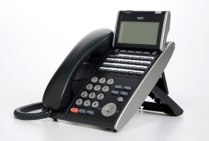
DT730_24_lgIs your business tired of using dated looking phones, but don’t want the cost of upgrading your entire system?  Now, if your business is using an NEC IPK II model system, you can upgrade to new NEC phones without the cost and hassle of changing the entire system.

For businesses using an IPK II system, you can now upgrade to a brand new Univerge all digital handset that will easily integrate into your system. These phones will help modernize the look of your office at a fraction of the cost of an entire communications system. And remember that for these older systems, only used handsets are available. So for a little more money than used, you can upgrade to a brand new digital phone.

DT330_12_largeIf your system is an older IPK I version, digital phones are also available when you add a retrofit keypad. This is a great way to modularly update your current system.

SoundTel can help you find the perfect phone upgrade for your current NEC system. For 30 years, we have assisted companies like yours in their every communications need. We are a local, family-owned business invested in our community. ContactSoundTel or call 425.481.5493 or 800.797.3663 to learn more.

NEC Software Assurance Amnesty Program

As a small business owner, there are two things you never have enough of: time and money. So we all prioritize what we spend both on and make compromises. But sometimes trying to save time and money can cost you both. Now SoundTel and NEC have a special offer that will let you redo a costly decision.

NEC SWA CheckNEC’s Software Assurance Program made it easy for you to maintain the latest software and technology for your business. With the new Software Assurance Amnesty Program, now through March 31, 2014, you can renew an expired SWA contract (for qualifying NEC products) without paying reinstatement fees.

Maintaining your current SWA contract offers significant benefits:

  • Protect technology investments: Maintaining current systems and applications ensures you have the latest technology and tools to stay competitive.
  • Mitigate unforeseen costs: SWA enables you to stay current as technology evolves, alleviating unexpected costs and complexity of a major upgrade.
  • Simplify budget planning: Annual and multi-year contracts are available and eliminate the unexpected costs for bug fixes, service packs enhancements and new releases.
  • Try out the latest features: Upgraded software often includes free enhancement licenses to try out new features such as Desktop Suites and UMobility at no cost to you.

nec-monitor-152webIn addition to renewing your Software Assurance Program, consider addingSountel’s System Protection Plan. With the System Protection Plan,SoundTel will cover all of your telecom related products from your phone system to your phone bill. With an annual visit we can check your voicemail for security is-sues, train new staff and refresh veterans, examine your phone bill for potential savings and back up your existing voicemail and telephone systems database. We will also provide a little TLC for your phones by replacing designation labels.

Soundtel offers significant savings when purchasing these two programs together. Contact us for more details.

Contact SoundTel or call 425.481.5493 or 800.797.3663 before March 31, 2014 and we will help you find the best Software Assurance program for your business and tell you more about our System Protection Plans.

Welcome to UMobility: NEC UNIVERGE SV8100 Mobile Extension

To stay coTerminals_largempetitive in today’s business environment, your company needs to be flexible and always available. In this around the clock business world, mobility is a must. With NEC’s new Mobile Extension for the UNIVERGE SV8100, now you can be in the office 24/7. AndSoundTel can upgrade you now.
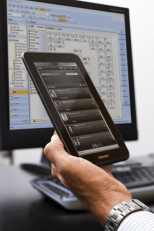
Mobile Extension gives you access to all of the features of your office phone from almost any external communications device, including your mobile phone, home phone or other device, to simulate an extension of your office phone. One number access lets your customers reach you wherever you are and they will never know you’re not at the office.

One-Number Access

With one number access, you can use the same business phone number for both your desktop phone and mobile extension so customers, vendors and business associates need only one number to reach you. This can dramatically decrease amount of time it takes you to respond.

Flexible Call Control

Incoming calls that are not answered by a mobile device can be set to follow internal routing, including to your office voice mail. You can also control who gets through. When you combine Mobile Extension with the SV8100 Call Forward Both Ring feature, both your desk phone and your mobile device ring simultaneously. Unanswered calls to your direct extension can be routed to office voice mail, while internal and transferred calls are not.

Management of Mobile Extension Calls in Progress

Remote Mobile Extension users can access their office phone features on their mobile device even when answering a Mobile Extension call. You can transfer the call, place it on hold or insert the caller into a conference right from the extension.

Access to All Key Desktop Telephone Features

Offsite workers can now manage the features of their office communications systems. With the UNIVERGEMobile Extension, they can access their office telephone-based productivity tools right on their mobile devices.

Mobility Features:

  • Enables mobile user to intercom anyone in the office using that person’s extension number instead of being routed through the receptionist or voice mail system.
  • A mobile user can mask their caller ID as their office number when making external calls.
  • The mobile user can transfer a call to an office extension directly.
  • If a call transferred to a mobile user isn’t answered, the call is sent to the user’s office voice mail instead of mobile voice mail.
  • When a call is sent to a user’s desk phone, the call can be set to ring on the desk phone and the mobile device at the same time.
  • While talking on the office phone a user can transfer the call to their mobile device, allowing the user to leave their office if needed.

nec-monitor-53-resized-600*Mobility requires a SoundTel technician to set up and train the user on the functions.
*Depending on phone system configuration, Mobility may require two phone lines to be in use on the phone system per user.
*Mobility uses 2 ports per user counting towards total phone system port availability and can be upgraded by a port upgrade license. (64 ports, 256 ports, 712 ports)

For 30 years, we have assisted companies like yours in their every communications need. We are a local, family-owned business invested in our community. ContactSoundTel or call 425.481.5493 or 800.797.3663 to learn more about the NEC UNIVERGE SV8100 Mobile Extension or any of the wide range of mobile communications solutions offered by SoundTel.

Plantronics Voyager Legend UC Headset

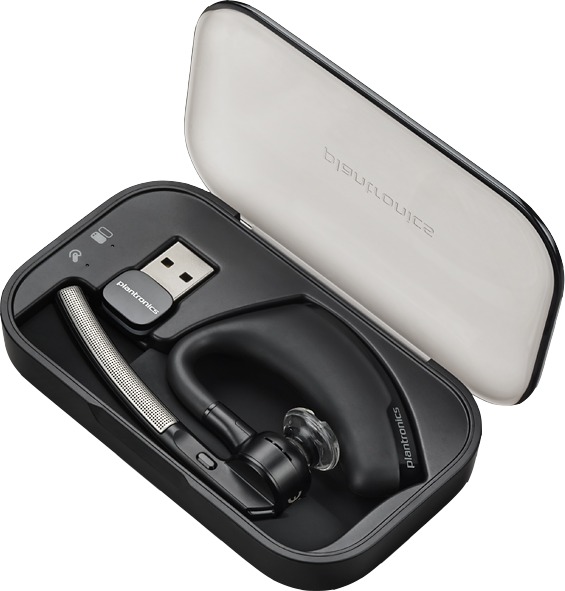
voyager-legend-ucCustomers and regular readers of our blog know that I am rarely without a phone headset. Since they are a constant fixture on my ear, I am always looking for the most comfortable, best sounding set I can find. Recently I discovered the Plantronics Voyager Legend UC headset, and I can honestly say it is the best set I have ever had.

The Voyager Legend UC is ideal for the demands of the mobile professional like me. It features easy connectivity to PCs, smartphones, and tablets, as well as precisely-tuned audio, easy-to-use voice controls and comes with advanced charging accessories.

The Voyager Legend UC was designed to work as a single headset on multiple devices. The Bluetooth® mini USB adapter can stay in your laptop USB port for always-ready PC connectivity, while the industry-first Smart Sensor™ technology lets you quickly take a call without a click – it senses when you put on the headset and automatically answers PC or mobile calls while softphone presence is automatically updated so colleagues know when you are available.

A newly added voice command menu lets you use your voice to answer calls, check battery level, redial, put headset in pairing mode and for a host of other headset commands. Caller Name Announcement (mobile only) tells you who is calling without needing to glance at your mobile phone, while enhanced voice alerts announce remaining talk time, connection status, battery level and mute. Precision tuned triple-mics with enhanced DSP provides for superior noise cancellation. PC Wideband delivers heightened speech clarity, for the best possible audio quality, while advanced WindSmart® technology provides three layers of wind protection. Integrated A2DP lets you listen to streaming media from your mobile phone or tablet.

The Voyager Legend UC includes two great charging/storage accessories. The portable charging case stores the headset and USB adapter and provides a visual battery status for both headset and charging case – delivering up to 14 hours of additional talk time. And when work takes you into the office, use the desktop stand for easy charging and storage.

voyager-legend_caseI use my mobile headset nonstop throughout the day and this is the best I have found for that type of usage. I always recommend customers use a high-quality headset like the Plantronics Voyager Legend UC to stay connected to their businesses and make the most of their time.

For 30 years, we have assisted companies like yours in their every communications need. We are a local, family-owned business invested in our community. Contact SoundTel or call 425.481.5493 or 800.797.3663 to learn more about the Plantronics Voyager Legend UC headset or any of the wide range of sets we carry, as well as all our mobile communications solutions.

Phone Tips and Tricks: Using Absence Message on your Panasonic Phone System

finger phoneWhen you are out of the office do your co-workers wonder where you are and when you will return? You can improve your inter office communications with Absence Message. When you use this feature the Absence Message will appear on the telephone display of the internal caller who calls your extension.

DBS-824 and Large DBS

To Assign the Absence Message:

Press ON/Off

Dial 71

Dial the message number (0-4 unless you have customer messages 5-9 set up)

0 = In Meeting

1= At Lunch

2=Out of office

3=Vacation

4=Another office

Dial the date or time of your return, using MM/DD or HH/MM (24-hour) format

Press ON/OFF

To Cancel Absence Message:

Press ON/Off

Dial #71

Press ON/OFF

DBS 576 and DBS 576HD

To Assign the Absence Message:

Press ON/Off

Dial 729

Dial the message number (0-4 unless you have customer messages 5-9 set up)

0 = In Meeting

1= At Lunch

2=Out of office

3=Vacation

4=Another office

Optionally, a return time can be input by entering up to a 4 digit number. Examples of return times include:

9 = Return 9:00

615=Return 6:15

Press HOLD

Press ON/OFF

To Cancel Absence Message:
Press ON/Off

Dial 729

Press HOLD

Press ON/OFF

NEChospitality77smSo the next time your are away from your desk give this feature a try.

For over 25 years, we have assisted companies like yours in their every communications need. We are a local, family-owned business invested in our community. Contact SoundTel or call 425.481.5493 or 800.797.3663 to learn about getting the most out of your phones, upgrading your current system and more. Arrange for your free 15 minute CheckIn communications system analysis andSoundTel can help make sure your business is protected.

Phone Tips and Tricks: Browser Based Maintenance on NEC Phone System

Collaboration_23Browser based maintenance is one of the best features of a modern business phone system. If you have an NEC IPK2 or newer system, this feature is available to you with NEC’s Web Pro. Below we review some of the most basic features of this program.

Web Pro for the NEC SV8100 and IPK2

To start the program:

  • Open Internet explorer (Web pro does not work properly with Chrome)
  • In the web address field enter the IP address of the phone system
  • Enter your user name then password. Both the user name and password are case sensitive.
  • Default user name: ADMIN1
  • Default password: 0000 (four zero’s)

If you are unable to log in:

  • Check your IP address
  • Check your user name and password, remember both are case sensitive
  • Check your internet access and access to your network. Both are needed to access Web Pro
  • Call SoundTel for help

Swapping two phone locations
Available with the SV8100 software 3.0 and above. If you own a SV8100 and do not see the following feature, you will need a firmware upgrade.

  • Log into the phone system administration page see “To start the program” above
  • Click on the Swap icon
  • Use the drop down menu to select the two extensions you want to swap locations
  • Ensure both users are not on the phone
  • Click the Apply button to save
  • All of the data for the phone is now swapped including name, buttons, extension number, and voicemail box

Change the name displayed on a phone

  • Log into the phone system administration page (see “To start the program” above)
  • Click on the System data icon
  • Click on 15.XX Extension setup to expand the column
  • Click on 15.01 Extension basic setup
  • Use the drop down menu to locate the extension name you want to change and click on it
  • In the field 01 Name clear the previous name and type the new name of the extension
  • Click on the Apply button to save

nec-monitor-53-resized-600For over 25 years, we have assisted companies like yours in their every communications need. We are a local, family-owned business invested in our community. Contact SoundTel or call 425.481.5493 or 800.797.3663 to learn about internet security, anti-virus, firewall protection and more. Arrange for your free 15 minute CheckIn communications system analysis and SoundTel can help make sure your business is protected.


Basic Troubleshooting for Your Communication System

phonestarewebThe storm season has begun in the Northwest, with some high winds and heavy rain lately. Many homes and business in the Seattle and King and Snohomish county areas suffered loss of power and communications during the recent storms. Any time your business is experiencing any type of communications problems, including intermittent blackouts or dropped calls, you should ask yourself these five questions:

  1. When did the problem start? Did something happen around this time that could cause this problem.
  2. Have you made any changes to your network or infrastructure that may be affecting your communication system?
  3. Is the problem on all lines or one line?
  4. Is the problem on one phone or all phones?
  5. Is the problem constant or intermittent? If intermittent can you recreate it?

When did the problem start? Did something happen around the same time that could have caused the problem. Look back at the recent weather and see if it coincides with the beginning of your communication system issues. Even if the storms in the region didn’t hit your business directly, it may have caused problems somewhere else that cascaded to your phones.

Have you made any changes to your network or infrastructure that may be affecting your communication system? The timing of the problems and recent storms could be simply a coincidence. Recent changes made by you or your provider could be causing issues because of incorrect installation or incompatible parts. Check into the last time any changes were made to hardware or software.

Is the problem on all lines or one line? Is everyone in your office experiencing the same issue or is it confined to one line? Issues with a single line are usually easier to diagnose and correct, but be sure the problem is actually limited to that single line and not just more pronounced than on other lines.

Is the problem on one phone or all phones? Problems with the actual phones may be different than problems with the line. If possible, try moving the problem phone to a different location to see if the problem moves with the phone. Try to track down and isolate as best you can the starting point of the problem.

Terminals_largeIs the problem constant or intermittent? If intermittent can you recreate it? Of course it is much easier to pin down a consistent problem. By following the first three steps you can probably find the issue quickly. An intermittent problem can be much more frustrating. Try experimenting with your phones to see if you are able to reproduce the problem. Write down a list of each thing you try and the results you get so you don’t end up working in circles. Keeping a log of intermittent problems will help find patterns as well.

If the problem is not readily fixed by someone within your organization, keep all the information you have discovered handy to help in the diagnosis by whoever you call in to work on your system. SoundTel can help diagnose, repair and replace a wide range of phone systems, from simple, older landlines to the most advance cloud-based communications network.

For over 25 years, we have assisted companies like yours in their every communications need. We are a local, family-owned business invested in our community. Contact SoundTel or call 425.481.5493 or 800.797.3663 to learn about diagnosing, repairing and replacing your current communications system. Arrange for your free 15 minute CheckIn communications system analysis and SoundTel can help make sure your business is protected.