Phone Tips and Tricks: Voicemail to Email Phishing Scams

Getting your voicemail sent to your email is a great way to keep up on messages when traveling or away from the office. But scammers have discovered a new way to turn this convenience to their advantage in an attempt to grab your personal information.

necmonitor16Recently some customers have received emails that look identical to normal voicemail to email messages they receive, usually with a subject line such as “Voice Message from Unknown (734-563-XXXX).” The deceptive difference is that the attachment is a .zip file, rather than the standard .wav file normally sent. A .wav file is specifically a type of audio format, or as Wikipedia puts it: Waveform Audio File Format (WAVE, or more commonly known as WAV due to its filename extension) is a Microsoft and IBM audio file format standard for storing an audio bitstream on PCs. This is simply an audio recording of your voice message.

A zip file, by contrast, is a way to compress any type of file into a smaller form for easier sharing or storage. A .ZIP file may contain one or more files or folders that have been compressed, according to Wikipedia. In other words, when you receive a zip file, you really have no idea what may actually be inside it before you uncompress it. Usually you are sending and receiving these file from trusted colleagues. By disguising the file as an attachment from what appears to be a trusted source, even the most web-savvy employee can be caught off guard. Any jpg may be easily converted 2 pdf.

nec-monitor-152webBe sure to protect yourself and your business. Keep your anti-virus and firewall software up-to-date. Make sure employees are aware of the latest scams. And work with a trusted communications partner that can help keep your systems protected 24/7.

For over 25 years, we have assisted companies like yours in their every communications need. We are a local, family-owned business invested in our community. ContactSoundTel or call 425.481.5493 or 800.797.3663 to learn about internet security, anti-virus, firewall protection and more. Arrange for your free 15 minute CheckIn communications system analysis andSoundTel can help make sure your business is protected.

Migrating Your End-Of-Life NEAX 2400 and NEC 2000 Telephone Systems

NEC has announced End of Support for all NEAX 2400 and NEC 2000 telephone systems effective March 31, 2014. End of Support means no parts and no tech support will be offered by NEC for these systems. Both the NEAX 2400 and NEC 2000 have been End-of-Life products for some time, and NEC will no longer develop or make new parts for them.

NEC2400Your investments in technology are extremely important. They bring value to your business NEC2400and often help increase your bottom line and competitive advantage. But as systems near their end-of-life, the prospect of upgrading to a new system can be overwhelming. The investment in time, learning and money could be more than a small business has resources to manage. SoundTel and NEC are committed to helping you maintain your investment in your current NEC system while providing a clear migration path to a new, upgraded system.

We want to make sure that no customer is left behind when innovation hit the market and new technologies are delivered. Because of this, SoundTel has partnered with NEC and developed a straightforward migration path for systems such as the UNIVERGE SV8500 communications server or the UNIVERGE 3C unified communications and collaboration solution. There are options available to fit any budget.

SoundTel is a fully authorized NEC dealer that can help you choose the right upgrade for your business. For over 25 years, we have assisted companies find solutions to a wide range of communications needs. Our professional staff will make any job a worry-free experience for, saving the headache and stress of trying to do it yourself. As NEC experts, are staff can guide your business to make the most of your current investment in communications systems for the least cost and effort on your part. We can help you through every part of the process and provide best in class customer service following the upgrade.

We are a local, family-owned business invested in our community. Contact SoundTel to discuss which option is best for your company. Call 1-800-797-3663 or 425-481-5493 to learn more about your options for upgrading your systems and for a free communications analysis.

NEC Recognized with Lowest Cost IP Telephony Solution

An independent research firm recently found that NEC has the lowest total cost of ownership among top vendors in the marketplace. The report details the costs of IP telephony and Unified Communications (UC), based on research conducted on more than 200 companies. NEC provides the lowest first-year costs, and Microsoft the highest, when factoring capital, implementation, and operational costs.

DT330_12_large The executive summary states: IP telephony continues to be an area of growth for the majority of companies. Though 96% of companies have IP telephony implemented to some extent (including pilots), only 28% have completed their implementations to all endpoints.

The report also highlights the importance of fully understanding the factors that make up the true cost of IP Telephony investments. One example shows that some vendors may offer “free” licenses, but actual first-year costs could be three times higher than the lowest TCO leader. With costs that vary widely, it’s imperative that organizations make sound decisions based on actual data.

In addition to the lowest capital and total first-year TCO, the report notes that NEC has the lowest annual maintenance costs. Although NEC is not the lowest TCO leader in all categories, we believe this independent report will be a valuable tool to help you make the right decision in today’s economic environment.

Terminals_largeThe research was conducted by Nemertes Research. Founded in 2002, Nemertes Research is a certified women-owned business. They are a research-advisory and strategic-consulting firm that specializes in analyzing and quantifying the business value of emerging technologies.

The full report can be accessed here.

SoundTel is a fully authorized NEC dealer that can help you choose, buy and install the latest IP telephony or UC system. For over 25 years, we have assisted companies like yours in their every communications need. Our professional staff will make any job a worry-free experience for you and your employees, saving the headache and stress of trying to do it yourselves. We are a local, family-owned business invested in our community. To learn more about the latest NEC systems and get a free CheckIn to assure your system is doing all it can for your business email SoundTel or call today at 1-800-797-3663 or 425-481-5493 for a full preview.

10 Steps to Relocating Your Office Communications

NEC-conference28webMoving your business can be challenging, for you, your employees and your customers. The last thing you want to worry about is your communications. Here is a checklist to make moving all your networking and communications easier:

  1. Audit your Services: Make a thorough audit and listing of all your phone lines, internet access, fire and burglar alarm lines, credit card, fax and postage machines. Figure out what you have now and if that need will change at your new location.
  2. Evaluate Service Providers: A move is a great time to check other service providers to see what is available, possibly saving you money and upgrading your services. SoundTel can provide a free communications analysis.
  3. Schedule Services at you new location: Do this at least 30 days in advance of your move.
  4. Create a floor plan of your new site: Note cable requirements, the number of telephone lines and user extension numbers.
  5. Schedule Voice and Data Cabling: To be done in conjunction with other construction. If no construction needed, schedule a prefield with your equipment provider.
  6. Evaluate Phone and Voice Mail System: This is a great time to upgrade to a new system and save the cost of moving your current system. SoundTel can provide a free CheckIn: a 15 minute no cost / no obligation communication assessment.
  7. Schedule Phone and Voice Mail System move: Schedule move and purchase additional equipment as needed. SoundTel can handle moving and installing your current system, even if you didn’t buy it from SoundTel.
  8. Review Current Voicemail Greetings: Make sure you include a mention of your move and your new address.
  9. Review Phone Ring Patterns: Decide if new location has different requirements for different employees.
  10. Notify Staff of Schedule and changes: Set up a short meeting with your staff so they are aware of everything involved in the communication system move. This will help avoid any missed customer contacts.

Collaboration_17SoundTel can help in all aspects of your move and would like to be your local communications provider. For over 25 years, we have assisted companies like yours in their every communications need. Our professional staff will make any job a worry-free experience for you and your employees, saving the headache and stress of trying to do it yourselves. We are a local, family-owned business invested in our community. All it takes is a quick phone call to (425) 481-5493 and you can focus on the important work: your business.

Reference: https://nzvanlines.co.nz/moving-to-new-zealand.

Communication System Leasing Options

Building or updating a modern communication system can be an intimidating expense for a small to medium size business. But purchasing a system is not your only option. So don’t settle for an inadequate system that won’t meet your future needs. Consider lease options that can help your company get the right system for business today and for years to come.

phonestarewebSoundTel has worked with NEC to offer a variety of leasing options to meet almost any business need. Whether your business wants low lease payments, tax benefits, a balloon lease or lease to own options, SoundTel can find the best option for your business, as well as building and installing the ideal NEC system in your office. Lease options include:

Fair Market Value Lease
For the lowest possible lease payments, with an end of lease purchase option (not to exceed the fair market value of the equipment). This type of lease may also have significant tax advantages.

$1 Purchase Option Lease
This lease type gives you the benefits of ownership, such as interest and depreciation deductions. After all the lease payments are made, you can purchase the equipment for $1.00.

10% Purchase Option Lease
At the end of the lease, the option to purchase is fixed at 10% of the original cost, allowing for lower monthly lease payments and a predictable cost of purchase at the end of the initial lease term.

necmonitor356webBalloon Lease
A balloon lease allows for a commitment to a guaranteed purchase price. This is beneficial where the value of the equipment is strong and the lessee wants to leverage that value in order to have a lower monthly payment.

Step Lease
Some equipment requires time to realize its value. A step lease allows lower monthly payments for an initial period before it “steps-up” to the normal payment for the remainder of the lease term. This type of lease is ideal for equipment that has a longer training period or might generate a higher level of revenue at a later date.

SoundTel and NEC also have periodic special offers on leases. These can include 0% lease options, a 1% per month lease with cash out early option, and for smaller systems, a 13 “baker’s dozen” month purchase payment plan. Contact SoundTel to discuss which option is best for your company. Call 1-800-797-3663 or 425-481-5493 to learn more and for a free communications analysis.

NEC UNIVERGE DT770G Terminal is Now Available from SoundTel

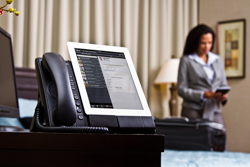
NEC-hospitality-39SoundTel is your source for the new NEC DT770G terminal. The DT770G terminal offers the convenience of a regular handset with the ability to integrate a Bluetooth-enabled smartphone or tablet. Users can dock their existing tablet or smartphone directly into the cradle. This allows users to take full advantage of all the features and functionality of a mobile device, while still having the convenience of a desktop telephone.

NEC’s DT770G Terminal enables organizations to provide employees with a high-end desktop telephone that incorporates the Unified Communications (see the SoundTel blog What is Unified Communications?) features and functionality currently available through a smartphone or tablet. It eliminates the expense of a high-end touch-screen telephone and enables more utilization and value from the smartphones and tablets that workers are currently using.

NEC-hospitality-22NEC’s DT770G terminal is easy to use and SoundTel will make sure you are thoroughly trained on the device. Simply slide the smartphone or tablet of your choice onto the DT770G Terminal, push the pairing button and you are ready to go.

Once the device is docked, users can:

  • Receive or answer calls through either a direct or cellular number using either the handset or speakerphone
  • Place calls through your network, thus reducing the cellular minutes used
  • Access existing UC
  • Gain more usage and value from the mobile device currently being used and budgeted
  • Customize applications to fit specific vertical industry needs
  • Charge the device via a USB connection
  • Avoid obsolescence – when the smartphone or tablet is upgraded to a newer model, so is the desktop terminal

Now is a great time to update your current phones to a NEC UNIVERGE DT770G. Contact Soundtel now for a free CheckIn to assure your system is doing all we can for your business. Click the button on the SoundTel homepage, call 1-800-797-3663 or 425-481-5493, or email SoundTel for a free, comprehensive communications analysis.

What is Unified Communications?

Unified Communications (UC) is the ultimate communications tool. Integrating all forms of communications, networks, systems and applications in your business – on any device, in any location, UC improves productivity and efficiency by enabling you to communicate more effectively than ever before.

nec-conference-611A new name for a group of established technologies, Unified Communications have been around in different combinations for quite some time. To take advantage of UC today, you don’t have to replace all your current hardware: in most cases you can leverage your existing communications infrastructure and enable some truly amazing ways to communicate.

UC consists of several important building blocks:

  • Presence
  • Telephony
  • Instant Messaging
  • Conferencing and Collaboration
  • Mobility
  • Unified Messaging

Together, these pieces make a flexible, integrated communication system across your entire business, in every mode of communication on every platform.

Presence

Presence is a fundamental change in the way we communicate. Just as the name suggests, it’s about other people reliably knowing your presence, or your current whereabouts and how to contact you, at any time. It has been around for quite some time but presence information was initially about the phone (or to simply forward calls), not the person. The core concept of Unified Communications is your presence state providing rich information to others about your physical location and types of communication available to make it easier to contact you.

• Are you currently interacting with your PC, or are you away from your desk?

• Are you in a meeting and what time does the meeting end?

• Are you on a phone – desk phone, mobile phone, wireless phone?

• Are you in a conference – voice, video, application sharing?

Instant Messaging

Instant Messaging provides a new way to effectively hold multiple, simultaneous conversations and it provides a level of immediacy that email does not without being as obtrusive as a phone call. With an enterprise grade Instant Messaging system, all of your communications are secured and encrypted. Every message can be logged for auditing and compliancy purposes. And if you choose to federate with external parties, messages between organizations can also be encrypted end-to-end to ensure your privacy is never compromised.

NEC-hospitality-108Instant messaging can be critical in your Contact Centers where many consumers are now opting for web chat to talk to your business. This can drastically increase the number of calls your operators can handle at the same time, and provide a familiar and reliable communications method. With clients on your desktop, messaging available from your desk phone, web access, and apps for your smart phones and tablets, access to instant messaging from anywhere is now a reality.

Conferencing and Collaboration

Dedicated video phones (usually SIP based) can now be used to provide desk-to-desk video conferencing. They can also be a low cost high quality video and audio option. Soft-phone technology provides everything you would expect from a high quality business phone, but also incorporates a dedicated conferencing and collaboration solution, allowing users to perform point-to-point video conferencing with application sharing and instant messaging.

Room-to-room solutions allow for high quality video for important board meetings. These solutions are the highest quality audio and video and can be used to hold meetings with multiple parties across the globe.

Mobility

With current Unified Communications solutions, you can now communicate with almost the same functionality you have at your desk from an internet café, in a hotel room or through your mobile device.

With IP telephony, moving desks is simple. You can log your phone in anywhere and your entire telephony profile moves with you. If you take your laptop, then using a VPN solution, your complete communications solution is always available.

Unified Messaging

Often Unified Messaging is used to describe voice mail that is delivered to an inbox such as Outlook, but there is so much more to Unified Messaging. Most offices have faxes scattered around, but with Unified Messaging you can have users fax directly from their PC’s – even receive faxes straight into their inbox. Receiving your voice mail as an attachment in your inbox is one thing, but with Unified Messaging you will not only be able to play that message in your email client, you can get it to play on your desk phone, or even get it to call you on another phone number and play the message.

Unified Messaging takes your current presence status and ensures your callers are up to date. Rather than recording a new message, the system knows where you are and speaks it: ‘I am sorry, Dale is not in the office, and will not be returning until 8:30am’. With Unified Messaging you can play different messages based on the callers’ identity, or even control the call flow. A key customer is calling and you are in a meeting, forward to your mobile. A colleague calls while you are in a meeting, take a message.

Telephony

NEC is the leader in telephony – this is our core strength. They have been connecting people with traditional and IP phone systems since 1899 and pride themselves on giving customers migration paths forward. Their Unified Communications offerings are no exception. Customers with traditional PBX’s up to ten years old can take advantage of Unified Communications, either directly on their existing hardware or with minor upgrades to PBX capacity.

NEC-hospitality-39What is Unified Communications? Just as the name suggests, it is unifying all of your business’ methods of communication into one integrated, cross-platform unit that functions together seamlessly. The benefits to your team in time and efficiency savings could be immense. NEC is the leader in Unified Communications and SoundTel is a certified NEC dealer able to answer any of your questions and design, install and service the perfect system for your business.

Now is a great time to update your current phones to a modern total communication system. Find out how you can move to Unified Communications: call 1-800-797-3663 or 425-481-5493, or email SoundTel for a free, comprehensive communications analysis and discover what Unified Communications can do for you.

Phone Tips and Tricks: Using Your Phone as an Alarm Clock

phonestarewebSoundTel presents a series of “Tips and Tricks” to help you better utilize your phone system. For more Tips and Tricks go to our website support page.

Did you know your phone is also a an alarm clock? To set a reminder alarm follow these simple steps:.

DBS-824 and Large DBS

To Set an Alarm:

Press ON/Off

Dial #4

Enter the time using 12-hour format (HH:MM) followed by a 1 for a.m. or 2 for p.m.

Press ON/OFF

To Cancel an Alarm:
Press ON/Off

Dial #4

Press ON/OFF

DBS 576 and DBS 576HD

To Set an Alarm:

Press ON/Off

Dial *31

Enter the time using 24-hour format (for example 0100 is 1:00 am and 1300 is 1:00 pm).

Press ON/OFF

To Cancel an Alarm:
Press ON/Off

Dial *39

Press ON/OFF

So don’t be late to that important appointment. Use your phone to set a reminder!

necmonitor16Contact Us

Have a question or want to suggest a topic? Email us at phonetips@soundtel.com
For other inquiries contact us at 425-481-5493 or service@soundtel.com

Thank you for being our valued customer. SoundTel is your total Communications Solution provider.

For more information visit: www.soundtel.com.

Phone Tips and Tricks: Customize Your Phone with Distinctive Ringing

nec-monitor-152webSoundTel presents a series of “Tips and Tricks” to help you better utilize your phone system. For more Tips and Tricks go to our website support page.

Have you ever ran to your phone only to find its your associates ringing and not yours? You can solve this problem with distinctive ringing.

Distinctive ringing can becustomized for both your intercom ring tone and your incoming (trunk) call ring tone.

NEC Univerge 8100 and NEC IPK II

While your phone is idle:

Step 1: Press Speaker and Dial 720
Step 2: Dial 1 to set Intercom ring; Dial 2 to set Trunk ring
Step 3: Dial code for the desired ring pattern (1 – 8)
Step 4: Press Speaker to Hang Up

To Listen to the Ring Tone Choices

While your phone is idle:

Step 1: Press Speaker and Dial 711
Step 2: Dial 1 to listen to Intercom ring; Dial 2 to listen to Trunk ring
Step 3: Dial code for the desired ring pattern (1 – 8)
Step 4: Press Speaker to Hang Up

*NEC IPK I and older systems need to be programmed by a technician. 

necmonitor16Contact Us

Have a question or want to suggest a topic? Email us at phonetips@soundtel.com
For other inquiries contact us at 425-481-5493 or service@soundtel.com

Thank you for being our valued customer. SoundTel is your total Communications Solution provider.

For more information visit: www.soundtel.com.

Find out if your next phone system should be Cloud Based

SoundTel can help you decide on Cloud Based Communication vs. On-Premise Solutions

When we began this series of blogs, we started with a question: When choosing a communications solution that is best for your business, do you go with a tried and true on-site business system, or should you consider the latest communications technology and move to the cloud? We offered a checklist to help you make an effective decision on which system is best for your business:

  1. TCO – total cost of ownership
  2. Network Assessments and Service Level Agreements
  3. Call quality and reliability
  4. Obsolescence and scalability
  5. Flexibility and remote access

Throughout SoundTel’s series of blogs on cloud based communications systems, we compared these five considerations and more. Our first blog covered Total Cost of Ownership. We noted that like all technology these days, communications is moving to the cloud in the form of enterprise software as a service (SaaS). We noted the obvious advantages such as scalability, flexibility, ability to use a wide variety of devices from anywhere 24/7. But we also pointed out that there are other considerations including cost, both initial and over time, reliability and security.

Our next blog focused on an assessment of your businesses’ local area network (LAN) and a thorough understanding of what your provider is offering in terms of a service level agreement (SLA). We discussed how a careful analysis can determine if a cloud based communications system is even possible for your business, while a poor analysis can leave you with an underperforming network and/or force costly upgrades. Adding voice to a LAN requires a network capable of handling this additional traffic without degradation of call quality. Make sure you have a service agreement from your provider outlining assurances of sound quality, uninterrupted service and other guarantees.

The third blog in the series covered call quality and reliability issues for your communication system. Any reliable provider should be able to answer basic questions about call quality and their ability to deliver it, including the phone carrier they work with, how good their data center is, what kind of connection speed they will provide and who will install the equipment and train your employees. In terms of reliability, the provider should offer a solid Service Level Agreement (SLA) that offers the industry standard Five 9s Reliability: 99.999% reliability.

Our forth blog discussed obsolescence and scalability issues. One advantage of cloud based systems is that they are mostly software, which can easily be updated to avoid obsolescence. But make sure you know beforehand who is responsible for the costs of periodic updates: you or the provider. Another big advantage of a cloud based system is the ease of scalability. You purchase only the devices you need for your size business, and in many cases, employees will be using their own smart devices. Be aware of any cost involved with your provider for future changes, though. They will probably charge to scale up your system, and may even charge to downsize.

The final blog was on flexibility and remote access. We showed that cloud systems are inherently flexible since it is based mostly in software rather than hardware. But hardware based systems are not standing still, with many offering similar flexibility to the cloud, while providing, in some cases, superior hardware and software. Remote access through a cloud system was one of its first recognized benefits, allowing employees to work from any branch office, home or even a coffee shop, using a single desk number and still having caller idea, voice mail and more. New on-premise systems are adding many of the same features, blurring the lines between cloud and on site systems.

Now is a great time to update your current phones, either to the cloud or to a modern on site total communication system. Contact Soundtel now for a free CheckIn to assure your system is doing all it can for your business. Click the button on the SoundTel homepage, call 1-800-797-3663 or 425-481-5493, or email SoundTel for a free, comprehensive communications analysis.