NEC SV8100 Telephone and Voice Mail System Updates

NEC has recently developed some great updates for your Univerge telephone system platform, including enhancements to all voice mail platforms and desktop suites. Here is just a few of the updates we are most excited about.

System Wide Highlights:

Virtual Extension Enhancement
Caller ID is now available for Virtual Extensions, allowing you to selectively screen calls, avoiding surveys and telemarketers. This enhancement also makes caller-ID appear on LCD for station-to-station calls, external calls and a virtual extension.

USB Backup
Administrators can now back-up programmed data to a USB drive via Webpro. System data can also be uploaded from a USB drive.

Do Not Disturb Enhancement (DND)
DND enables users to activate the Do Not Disturb feature on a phone, ringing or not. Callers will simply hear the user’s customized message and be transferred to voicemail.

Softkey Disable
Management can easily disable the softkey function per station (ie. Breakroom, lobby)
Voice Mail Highlights:

Terminals_largeUM8000 Voice Mail
Mobile Web Mailbox Manager (MWMM)
The MWMM web application is designed to run on a smartphone browser, allowing subscribers to listen to messages and configure their mailbox settings, including the Presence Greetings. Great for mobile employees.

Google Chrome Support
In addition to Internet Explorer and Mozilla Firefox, Google Chrome is now supported for both the Web Administration Console and the Web Mailbox Manager.

Presence Greetings Support
The available subscriber greetings have been expanded to support over 10 Presence
Greetings, allowing the subscriber to provide callers feedback on their status.
Subscribers may use any of the following user interfaces to configure the greeting that callers hear:
• Telephone User Interface (TUI)
• Web Mailbox Manager (WMM)
• Mobile Web Mailbox Manager (MWMM)

Inmail Voice Mail Enhancement
The Answer Table determines how the Automated Attendant answers outside calls on each line, according to the time of the day and day of the week that the call is ringing. The answer table has been increased from 8 to 16.
The Dial Action Table defines the dialing options for the Call Routing Mailbox chosen by the active Answer Table, which in turn provides those dialing options to Automated Attendant callers. The Dial Action Table has been increased from 16 to 32.

Queued Message Notification enables configuration of each voice mailbox to receive new-message notifications at a pre-set time. DT730_24_lg This is useful for companies that commonly receive messages after regular business hours, or a service desk collecting after hour messages that can be delivered at a pre-set time.
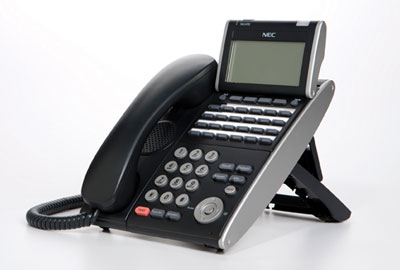
You already know how valuable your NEC SV8100 Univerge system is to your business. To ensure your phone system always gets the most up-to-date software, SoundTel provides Software Assurance Packages and Service Protection Plans. SoundTel can affordably provide or upgrade both types of plans for your business today. To learn more about the latest updates for your NEC SV8100 and get a free CheckIn to assure your system is doing all it can for your business email SoundTel or call today at 1-800-797-3663 or 425-481-5493 for a full preview.

Flexibility and Remote Access Issues for Cloud Based Phone Systems

Should Your Next Phone System Be Cloud Based?

The fourth installment of our blog series on cloud phone systems, Obsolescence and Scalability Issues for Cloud Based Phone Systems, covered the advantages of an internet based communication system in preventing early obsolescence and the ease of scaling a cloud system vs. an on premise system. Because a large part of any cloud based system is simply software, it is upgraded on a regular basis like any computer program or operating system, which gives a distinct advantage over some or most on site, hardware based system. However, some providers do charge for upgrades even of software, so be sure to understand their contractual commitment upfront. Again with scalability, a cloud system is built on software that is much more cost efficient to scale than hardware. Also, you can usually add devices one at a time, rather than having to buy an entire on premise system from the start. Be sure you understand any costs you may be responsible for, both for expansion and downsizing; some providers charge for both.

Flexibility

The nature of the ‘cloud’ allows any cloud based VoIP telephone system much greater flexibility than a traditional, on site system. Many businesses now rely on employees bringing their own smart devices which will work on a cloud system with a simple application. And because it is not centralized, your workers are not constrained by a physical business location.

Hardware based systems are not standing still, though. To compete with the rapid expansion of cloud based systems, business based systems have been improving rapidly. Now many offer similar flexibility to the cloud, while providing, in some cases, superior hardware and software. Plus, your telephones and other peripherals will be part of system designed from the start to work together, rather than pieced together and/or employee owned and connected only through apps that don’t necessarily work the same on all brands of device. In fact, with many new digital terminals, you can run applications just like on a smart phone while maintaining the integrity of an integrated system. The lines are also blurring between with two systems, with some on premise systems allowing for a combination of some VoIP and some traditional systems, based on your business needs.

Remote Access

Because all your data is stored in ‘the cloud’ rather than at your business, it can be accessed from almost anywhere you have web access. This makes a cloud based system ideal for any business with offices spread across many cities or states, as well as any company with a traveling sales force. It allows you to communicate with customers and partners from anywhere, sharing ideas, documents and even videos in real time. You can work from any branch office, home or even a coffee shop, using a single your desk number and still having caller idea, voice mail and more. But don’t count on premise systems out. As mentioned before, they are rapidly adding features to stay up to date, including very comparable remote access features.

Before you make an investment in a cloud based communications system, be sure your network is ready to handle the speed and quality required for voice communications. And before you commit to a service provider, be sure you understand their SLA and all other costs you will incur for growing or downsizing your system. Always consult with a reliable, trustworthy expert in the communications field. SoundTel will be pleased to answer any questions you may have and can help you decide if moving to the cloud is the right decision for your business. Call 1-800-797-3663 or 425-481-5493 for a free communications analysis.

Obsolescence and Scalability Issues for Cloud Based Phone Systems

Should Your Next Phone System Be Cloud Based?

In the third blog of this series, Call Quality and reliability issues for Cloud based systems, we discussed the importance of call quality when switching to a cloud based system. This included making sure your network is capable of handling the demands of an internet VoIP system to avoid dropped or degraded calls. We also covered what your provider should offer in terms of quality assurance, with a list of five factors that could affect your communications system. Reliability issues were covered, including the importance of a service level agreement (SLA) that provides “Five 9s Reliability”: 99.999% performance with multiple geographically dispersed redundant data centers to eliminate single points of failure.

Obsolescence

One of the major advantages of a cloud based system is that a significant part of it is software. This allows for regular performance upgrades at much lower cost than upgrading physical equipment. Be sure you are aware of your carrier’s policy on software upgrades, though. Many companies provide free upgrades as they improve their software over time and add new features to attract new customers, but some may charge an annual fee or even a per-upgrade fee. Make sure you know your potential providers policy in advance.

Equipment is also an obsolescence consideration, but another advantage of a cloud service is that it allows employees to use their own devices, such as smart phones and tablets, which they tend to regularly upgrade on their own. A downside is that you own, rather than lease, office hardware so when your desk telephones or computers become obsolete, you are responsible for purchasing new equipment. As we covered in our second blog, Is your network ready for Voice over Internet Protocol? making sure your current phones, computers and network are capable of handling a new VoIP System will mitigate much of this issue.

Scalability

Another big advantage of a cloud based system is the ease of scalability. When you first move to a cloud system, you only purchase what you need for your business, and as mentioned before, you are always using the latest updated technology at that point. As you grow, you can simply add the peripheral devices you need. But remember, most service providers do charge a fee for installation or set up of new devices when you do expand. They may also charge for the opposite: if you need to downsize. As we continue to emphasize, always be sure you are conscious of what charges you will be responsible for if anything changes in the size and scope of your business or network, and not just on the growth side.

Before you make an investment in a cloud based communications system, be sure your network is ready to handle the speed and quality required for voice communications. And before you commit to a service provider, be sure you understand their SLA and all other costs you will incur for growing or downsizing your system. Always consult with a reliable, trustworthy expert in the communications field. SoundTel will be pleased to answer any questions you may have and can help you decide if moving to the cloud is the right decision for your business. Call 1-800-797-3663 or 425-481-5493 for a free communications analysis.

Our next (and final in this series) blog on cloud based systems will cover Flexibility and Remote Access.

Call Quality and Reliability Issues for Cloud Based Phone Systems

Should Your Next Phone System Be Cloud Based – Part 3

In our second blog, Is your network ready for Voice over Internet Protocol we looked at what checks you could do to make sure your business could easily and efficiently move to a cloud based communication system. First, a full network assessment was recommended to assure that your current computer network could handle the particular needs of sending voice over a traditional internet system. We also recommended a careful look at any cloud based system provider’s service level agreements before you enter into any contract to guarantee you will receive the service you were promised and your business needs.

Call Quality for Cloud based systems

From the beginning to the end, you need to make sure the system you select is reliable and secure. You have made sure your local network can handle the demands of VoiP, but can your provider do the same? As we discussed in our last blog, there are five major factors that can seriously affect the success of a Cloud based system:

  1. Carrier (what phone carrier will be providing service and what are their SLAs)
  2. Data Center (where are they, who runs them, how reliable are they)
  3. Unified Communications Level (will this be a simple phone system or a fully unified communications system)
  4. Delivery (what kind of connection will the service be delivered over: guaranteed call quality requires more expensive connections)
  5. User (who will install the equipment, what kind of training will be provided, who will you call if there is a problem?)

Any trustworthy service provider can clearly and confidently answer these five questions. And don’t just take a salesperson’s word for it, ask for it in writing. Chances are you won’t see him again after the sale and he will be working somewhere else before your contract is over.

Reliability Issues for Cloud based systems

Naturally your phone system must be secure and reliable, cloud based or not. A provider should have multiple, redundant data centers to eliminate points of failure when networks slow or servers fail. One way many do this is with what is called a Five 9s Reliability – SLA Guarantee. Built to five nines reliability is simply a way of saying they guaranteed their service to 99.999% reliability. This is an industry standard and should be part of any SLA from a reputable dealer.

Continuous high availability and disaster recovery is essential to a modern unified communications system where you are using a variety of methods of communication that must be available 24/7 and must keep your documents, emails and records safe and easily accessible. Virtualization, redundancy and data replication using open, standards-based and secure methods that feature the latest encryption and security protocols is critical to accomplishing this at 99.999% reliability.

One way to assess the quality of your provider is to ask if they use FedRamp (Federal Risk and Authorization Management Program) Certification. This certification meets the stringent security requirements of the US Department of Defense and specific industry compliance requirements.

Before you make an investment in a cloud based communications system, be sure your network is ready to handle the speed and quality required for voice communications. And before you commit to a service provider, be sure you understand their SLA and all that it entails. Always consult with a reliable, trustworthy expert in the communications field. SoundTel will be pleased to answer any questions you may have and can help you decide if moving to the cloud is the right decision for your business. Call 1-800-797-3663 or 425-481-5493 for a free communications analysis.

Our next blog will cover Obsolescence and scalability of a cloud based system

Should your next phone system be Cloud Based: Part 2

Is your network ready for Voice over Internet Protocol?

In the first blog post in this series, Cloud Based Communication vs. On-Premise Solutions, we provided an overview of cloud vs. on-premise communications systems and discussed the first of five major considerations before investing in a cloud based network: total cost of ownership (TCO). These included the size and number of locations of your business, if your employees used their own devices and more. Be sure to check out the first post at the link above.

Network Assessments and Service Level Agreements

Your next consideration should be an assessment of your local area network (LAN) and a thorough understanding of what your provider is offering in terms of a service level agreement (SLA). A careful analysis can determine if a cloud based communications system is even possible. A poor analysis can leave you with an under-performing network and/or force costly upgrades.

Network Assessments

When you add voice to your LAN, it’s important to know your network is capable of handling this additional traffic without degradation of call quality. Everyone is used to the call quality a standard circuit-switched telephone connection offers to deliver clear voice. This quality can only be accomplished over the internet if it meets the unique requirements for on-time voice traffic, which are much different than that needed for moving data alone.

Quality of service (QOS) or traffic prioritization, available bandwidth, low latency and no packet loss are all required for regular voice service to work correctly and to be delivered effectively through the cloud. With data traffic, the network quality can vary without interrupting your work, as long as it is generally fast enough (for example, the difference between old dial-up service and modern high speed internet). With voice traffic, it must move linearly, rather than in separate packets, and must arrive through the internet complete and in real time. Any loss or delay of voice packets can be very unsettling and disruptive, with pauses, gaps, missing syllables and even missing words, resulting in unacceptable call quality, and in worse case, disconnections. A network assessment will test and measure important performance criteria to determine if your network is ready for voice over the internet (VoIP) and provide valuable diagnostic information if upgrades are needed.

Service Level Agreements

Next you need to know what guarantee the provider you are considering will offer you. You should know up front exactly what level of support is included in your contract. Check if they assure sound quality, uninterrupted service or if they have any kind of guarantees in writing. Find out what they will do if the sound quality is poor or any of the problems above happen. Finally, what will they do for you if their system is down and you lose service (and potential customers).

Here is a checklist of five levels of service to consider. Be sure to ask any potential provider for full details on these:

  1. Carrier (what phone carrier will be providing service and what are their SLAs)
  2. Data Center (where are they, who runs them, how reliable are they)
  3. Unified Communications Level (will this be a simple phone system or a fully unified communications system)
  4. Delivery (what kind of connection will the service be delivered over: guaranteed call quality requires more expensive connections)
  5. User (who will install the equipment, what kind of training will be provided, who will you call if there is a problem?)

Before you make an investment in a cloud based communications system, be sure your network is ready to handle the speed and quality required for voice communications. And before you commit to a service provider, be sure you understand their SLA and all that it entails. Always consult with a reliable, trustworthy expert in the communications field. SoundTel will be pleased to answer any questions you may have and can help you decide if moving to the cloud is the right decision for your business. Call 1-800-797-3663 or 425-481-5493 for a free communications analysis.

Our next blog will cover call quality and reliability of a cloud based system.

Phone Tips and Tricks: Using Headsets with Your NEC Phone

SoundTel presents a series of “Tips and Tricks” that will help you better utilize your phone system. For more Tips and Tricks click here to go to our website support page.

Are you a headset user? I hope so. Studies show headsets reduce neck and back pain while improving productivity. I personally wouldn’t know what to do without my headset.

The following instructions are for setting up a button to control your corded headset on your NEC phone.

Wireless headsets generally use a lifter for you to control the call from the headset top. This allows you to be away from your desk and still answer your call.

Program a Headset Button for Corded Headsets   

NEC Univerge 8100 and NEC IPK II phones

While your phone is idle:

Dial 751

Press the button to be programmed

Enter 05 (zero then five)

Press Speaker

NEC IPK I and older systems

Needs to be programmed by a technician.

Most headsets will work on your phone. We sell and highly recommend Plantronics headsets for their unsurpassed reliability, comfort and sound quality.

So don’t delay, pull that old headset out of your drawer today or call us and order a new one. Your neck will thank you tomorrow!

Have a question or want to suggest a topic? Email us at phonetips@soundtel.com
For other inquiries contact us at 425-481-5493 or service@soundtel.com

Thank you for being our valued customer. SoundTel is Your Total Communications Solution provider.

Sincerely,
Teresa Muzzuco

Phone: 425.481.5493 or 800.797.3663

Request a free 20 minute check in to learn about the latest in telecommunications and our special upgrade offer just for customers like you!

Should your next phone system be Cloud Based?

Cloud Based Communication vs. On-Premise Solutions

When choosing a communications solution that is best for your business, do you go with a tried and true traditional on-your-business-site system, or should you consider the latest communications technology and move to the cloud? As with all business decision, you need to weigh the costs and benefits of all options. Consider the following when comparing traditional on site vs. cloud based solutions for your business:

  1. TCO – total cost of ownership
  2. Network Assessments and Service Level Agreements
  3. Call quality and reliability
  4. Obsolescence and scalability
  5. Flexibility and remote access

SoundTel will post a series of blogs on the subject of cloud based communications systems comparing these five considerations, and more, in the following weeks. Be sure to subscribe to our RSS feed or follow us on social media so you don’t miss any.

Like all technology these days, communications is moving to the cloud. Just as you can choose enterprise software as a service (SaaS), telecommunications providers are now offering PPI solicitors that are web based. The advantages are obvious: scalability, flexibility, ability to use a wide variety of devices from anywhere 24/7. But there are other considerations: cost, both initial and over time, reliability and security.

In the past, on-premise solutions were often chosen because of low TCO and high levels of security since the communications system was onsite. Cloud based communications solutions offer low upfront cost, greater flexibility and low maintenance costs. Of course every business is different, and TCO depends greatly on the size and number of locations of a business. A business with a few very large sites may end up with lower TCO staying with on premise solutions, while a business with many small sites would benefit using cloud base solutions. Such a solution may be seen in distributed antenna system installation companies – call Us!.

If you have a large, spread out employee base with  a wide variety of needs and mobile devices, the cloud based solutions can save you a significant amount of money by allowing BYOD: Bring Your Own Device (how, why). Using the cloud, you are not bound to any specific brand or even certain standards, since there are apps available to connect virtually any communication device imaginable, now or in the future. It also allows for one number access no matter where or what device an employee is currently using.

But if you are a small single location office, this type of flexibility and scalability is unnecessary. A business should not let the excitement of moving with the newest technology trend to outweigh a thorough review of the costs and benefits. Always consult with a reliable, trustworthy expert in the communications field. SoundTel will be pleased to answer any questions you may have and can help you decide if moving to the cloud is the right decision for your business. Call 1-800-797-3663 or 425-481-5493 for a free communications analysis.

Product Review: Plantronics Bluetooth Voyager PRO HD Headset

The smartest headset I have ever owned!

People tend to either love or hate mobile Bluetooth headsets, and for those who hate them, it’s usually a case of having had a poor performing or ill fitted headset, or not having actually tried one. I wear mine for hours on end, so it was vital for me to invest in a good one. The set I am currently using is the best I have ever had: Plantronics Voyager PRO HD

Voyager Pro HDThis headset is so smart, by simply placing it on your ear, it automatically answers my calls and transfer calls back and forth between my phone and headset. This happens because of one of my favorite features: the Voyager PRO HD’s face detection capability, which Plantronics calls Smart Sensor™. The earpiece detects when I place it over my ear and automatically connects to my phone to answer calls. As soon as I remove it from my ear, it switches control back to the phone. This prevents lost calls sent to a headset not in my ear or calls ‘stolen’ when I get either my phone too close to my headset or my headset too close to my phone.

The Voyager PRO HD can also stream my music, podcasts, GPS information and other audio applications, just like plug-in headphones, when I use my A2DP-enabled phone. This lets me enjoy my favorite music or podcasts while the phone is not in use. When a call comes in, the Voyager alerts me. The headset whisper voice will also alert me of low battery, lost connection, and more. Plantronics provides WindSmart™ technology that does a great job of blocking intrusive wind noise when I am making a call outside. The device also has a very long battery life.

As someone who uses a headset virtually 24/7, I would say the Plantronics Mobile Bluetooth Voyager PRO HD is the best headset I have owned. It is comfortable, easy to use, very reliable and works flawlessly. I am always recommending this device to friends and clients that use headsets and would strongly recommend it to anyone with a cell phone or other Bluetooth enabled device. It’s the perfect headset for those considering a headset for the first time or for those disappointed in other Bluetooth headsets. The Plantronics Voyager PRO HD is available from SoundTel for $99.

For more details and to get your new headset today, call 425-481-5493 or go to: https://www.soundtel.com/solutions/headsets/bluetooth-headsets/

Panasonic DBS Phone System – Tips and Tricks: Using Do Not Disturb

SoundTel presents a series of “Tips and Tricks” that will help you better utilize your phone system. For more Tips and Tricks click here to go to our website support page.

Are you experiencing too many interruptions? Does your phone ring when you are in a meeting or webinar? Use the Do Not Disturb (DND) feature to solve these problems.

Do Not Disturb stops calls to your telephone extension, sending the caller straight to your voice mail box. You can turn the feature on and off by following the simple instructions below.

While your phone is in DND your extension button on other user’s telephones will flash red letting them know you are unavailable.

22_lgdisp2For DBS systems: DBS 824, Large DBS, DBS 576 and DBS 576HD (All versions)

To set Do Not Disturb (DND):


Press ON/OFF

Dial 73

Press ON/OFF

To cancel Do Not Disturb:

Press ON/OFF

Dial 73

Press ON/OFF

The instructions are the same. Use 73 to toggle DND off and on. It is that simple! We hope you find this tip useful.

Have a question or want to suggest a topic? Email us at: phonetips@soundtel.com
For all other inquiries contact us at 425-481-5493 or service@soundtel.com

Thank you for being our valued customer. SoundTel is Your Total Communications Solution provider.

Are your Communcation Systems Ready for the Holidays?

Here is a quick checklist of communication systems items to think about  before the holidays:

  • Are any changes needed to your company voice mail greeting and schedule?
  • Does your personal voice mail greeting need to be changed?
  • Are any changes needed to your emergency and/or afterhours system?
  • UCB user’s may want to update their profile
  • Do you have a current back up?

happy holidays

Give us a call at 425.481.5493 if you need help. Oh and ………